

Trust Wallet is one of the world’s largest self-custody crypto wallets. The company says that more than 200 million people trust its products. Adding correct token data and a logo can make your project easier to find and recognize in the wallet. This guide explains the current way to submit a token to the Trust Wallet Assets repository.
Updated: July 15, 2026.
Besides, don’t forget to add the coin’s logo to the Metamask wallet. In addition, showcase your token logo on Uniswap. However, if you run a token on the Tron network, then add your coin to the TronLink wallet for TRC20 altcoins. Additionally, founders aiming to fix missing logos or blank valuations should review the ultimate OKX Wallet token listing tutorial before expanding to more wallet ecosystems.
Also, launch your token on blockchains such as the Ethereum blockchain, the TON platform, the Tron network, and the Solana ecosystem. Moreover, BNB Smart Chain, Base platform, Polygon protocol, and Arbitrum blockchain will help scale adoption. In addition, teams comparing wallet visibility paths can use this SafePal token listing checklist to separate token search, custom-token fallback, price data, swap support, and promotion before announcing wallet support.
What’s Trust Wallet?
The Trust Wallet is a self-custody wallet for mobile devices and browsers. People can use it to hold crypto and NFTs, connect to Web3 apps, swap assets, and use other blockchain services. Self-custody means that users control their own wallet keys and funds. Also, scrutinize the top-performing cryptocurrency trackers.
Advantages
Showing the correct token name and logo in Trust Wallet can help your project in several ways:
- Making the token easier to recognize for a platform trusted by more than 200 million people.
- Helping users tell the official token from copycat tokens.
- Giving users consistent project information inside the wallet.
- Making the token easier to find and use in Trust Wallet.
Requirements
Before you apply, check the current Trust Wallet acceptance rules. Meeting every rule does not guarantee approval.
- Your token should have at least 10,000 real holders and 15,000 transactions. Tokens sent by airdrop do not count toward these numbers. Trust Wallet may change the threshold for a specific case.
- Your project needs a live website and a detailed white paper. The documents should explain the use case, roadmap, and tokenomics.
- Your project needs active social media channels and a support team that answers users. Fake followers and bots can lead to rejection.
- Your name, logo, text, and other branding must be original. Do not copy another project or use branding that looks like a well-known token or stablecoin.
- The token must have a detailed listing on CoinMarketCap. A Coingecko page can provide extra proof, but it does not replace the CoinMarketCap requirement. You may need to list a token on an exchange to get a listing on CMC & CG.
- The smart contract needs a full audit from a reputable security company. Inspect leading audit experts and fees. You can also contact us at [email protected] to discuss an audit.
Trust Wallet may reject projects that look unsafe, copied, misleading, spammy, fraudulent, or low value. Passing the automatic checks and paying the fee are not promises of approval.
Prepare information
Prepare the following token information before you open the Assets web app. The example below shows the type of data you will need:
- Token Name: Galactic Quadrant
- Type: BEP20
- Token Symbol: GQ
- Decimals: 18
- Description: Galactic Quadrant (GQ) is a utility token for the Outer Ring videogame that allows in-game and off-game purchases.
- Website: https://outerringmmo.com/.
- Explorer: https://bscscan.com/token/0xf700d4c708c2be1463e355f337603183d20e0808.
- The id/contract/address of the token, same as the subfolder name: 0xF700D4c708C2be1463E355F337603183D20E0808.
- Links: official social media, documentation, source code, audit, and coin-tracker URLs. Use only link types supported by the current form.
- Tags: choose at least one tag that truly describes the token. You will see the available choices in step #4 below.
- Contract Address: 0xf700d4c708c2be1463e355F337603183D20e0808.
- Checksum address (for ERC20 and BEP20 tokens): 0xF700D4c708C2be1463E355F337603183D20E0808.
- Logo: use a 256×256 pixel PNG file named
logo.png. The extension must be lowercase.png. A transparent background is preferred.
Processing fee
You must also prepare a non-refundable processing fee. In step #5, the current fee is 500 TWT or 2.5 BNB for each pull request. The merge-fee-bot posts the exact payment address, network, and memo instructions inside your GitHub pull request. Example.
Always follow the newest bot message before paying. Check the token, network, address, amount, and memo carefully. A wrong payment cannot be reversed. The fee pays for review, not approval, and Trust Wallet does not refund it if the pull request is rejected.
Trust Wallet Request Statistics
Payment does not mean that a request will be accepted. A public GitHub check of other projects on July 15, 2026 found 107 pull requests created in 2026 with the label “Payment Status: Paid.” Of these, 14 were merged, 74 were closed without a merge, and 19 were still open. In this snapshot, 13.1% of all paid requests were merged, 69.2% were closed without a merge, and 17.8% were still waiting.
These numbers are not an official Trust Wallet approval rate. The results can include duplicate requests, broken submissions, token updates, unsafe projects, and requests closed by their authors. The main point is simple: the fee pays for a review, but it does not guarantee approval.
Trust Wallet Paid Request Statistics
Payment does not mean that a token request will be accepted. Here are the results of a public GitHub check of other projects.
Public GitHub snapshot taken on July 15, 2026. Included requests had the label “Payment Status: Paid.”
Blockchains
The Assets repository supports many networks. The current new-token guide directly covers Ethereum ERC20, BNB Smart Chain BEP20, Solana SPL, and TRON TRC10 or TRC20 tokens. The repository also contains TON tokens and assets on several EVM networks, such as Base, Arbitrum, Optimism, Polygon, and Avalanche. Choose the exact network type shown in the Assets web app. Do not select a similar network just to make the form pass.
Steps
Follow the steps below to add a token to the Trust Wallet.
Step 1. Sign in to GitHub
Create a GitHub account or sign in to your existing account. Then open the assets page.
Step 2. Create a fork
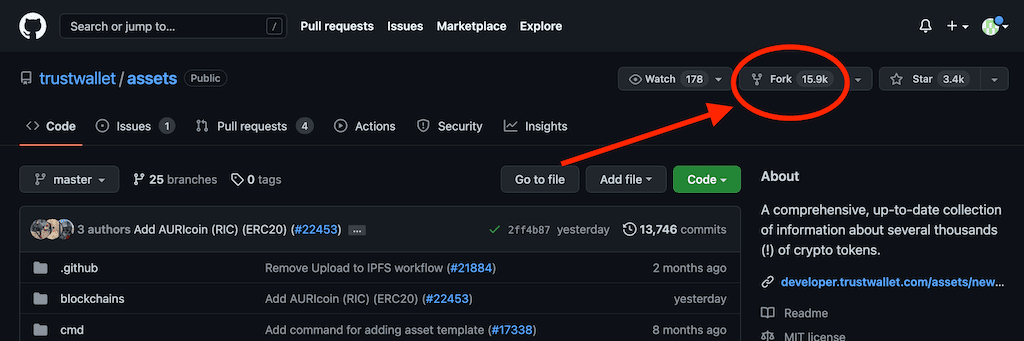
Create your own fork of the Trust Wallet assets repository. The Assets web app needs this fork so it can create a pull request from your GitHub account. Click the Fork button shown below.
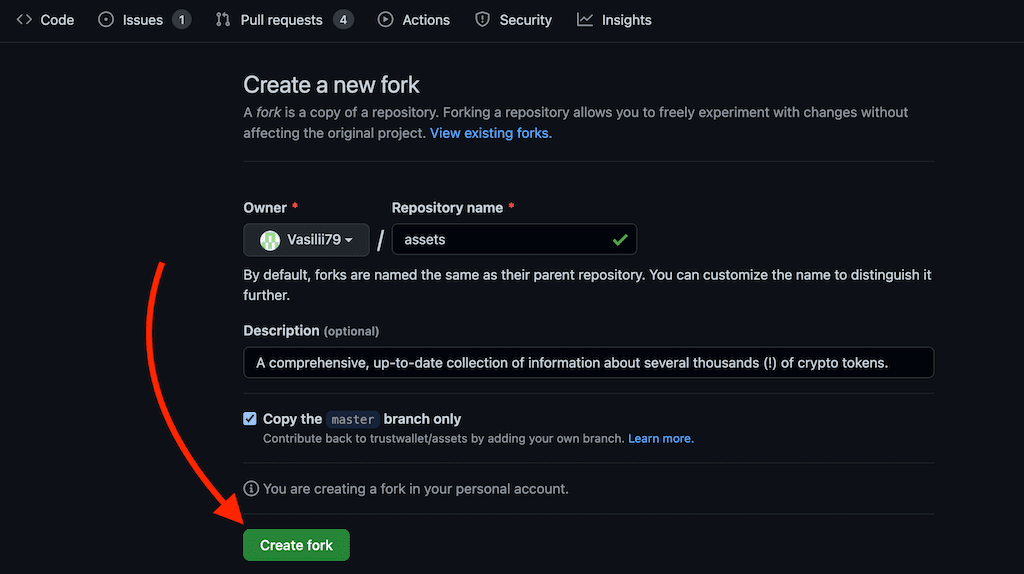
Then press the “Create fork” button. Wait until GitHub finishes creating the fork in your account.
Step 3. Open the Assets web app
Open https://assets.trustwallet.com/ and sign in with GitHub. Authorize the app if GitHub asks. The page will check for your fork. If it cannot find one, use the fork button on the page or reload after GitHub finishes creating it.

Step 4. Fill the form
Upload the logo and fill in the token type, contract address, name, symbol, decimals, website, explorer, description, official links, and at least one correct tag. For ERC20 and BEP20 tokens, use the checksum version of the contract address. Click “Check” first. Create the pull request only after the app says that the logo and token data are valid.

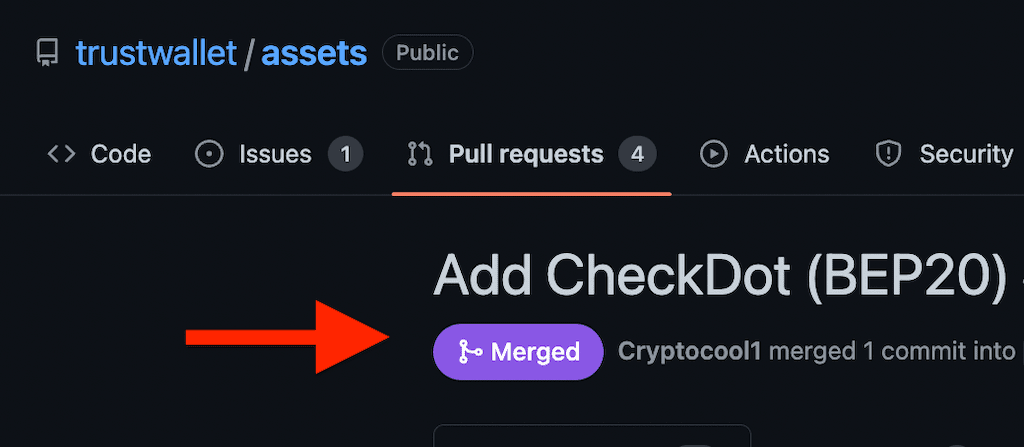
After that, copy a link to the pull request and open it. For example, https://github.com/trustwallet/assets/pull/22512.
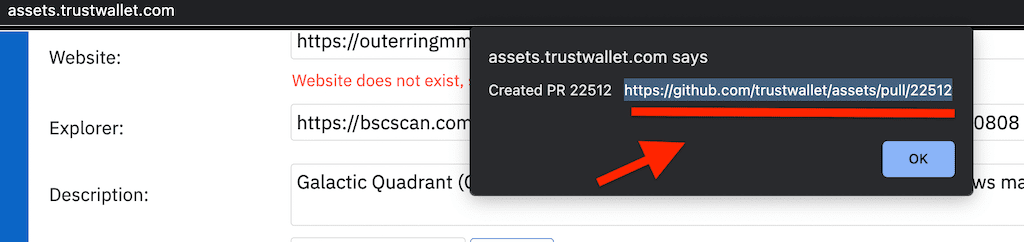
Some checks were not successful.
If an automatic check fails, open the failed check and read the exact error. Do not pay the fee until the token files pass the checks.

Open the changed token folder in your pull request and review the generated files.
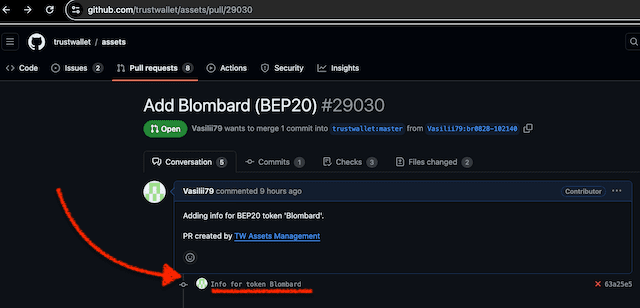
If needed, edit info.json in your fork. Check that decimals is a number, the contract address uses the correct format, every link uses a supported link type, and every tag is valid. The pictures below show the GitHub editing process.
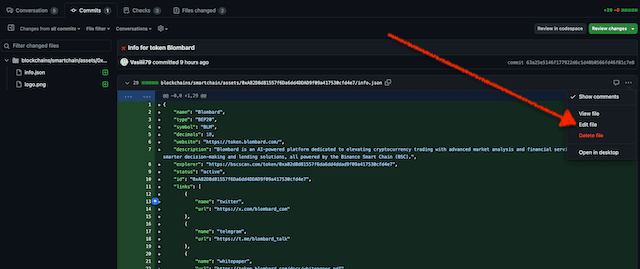

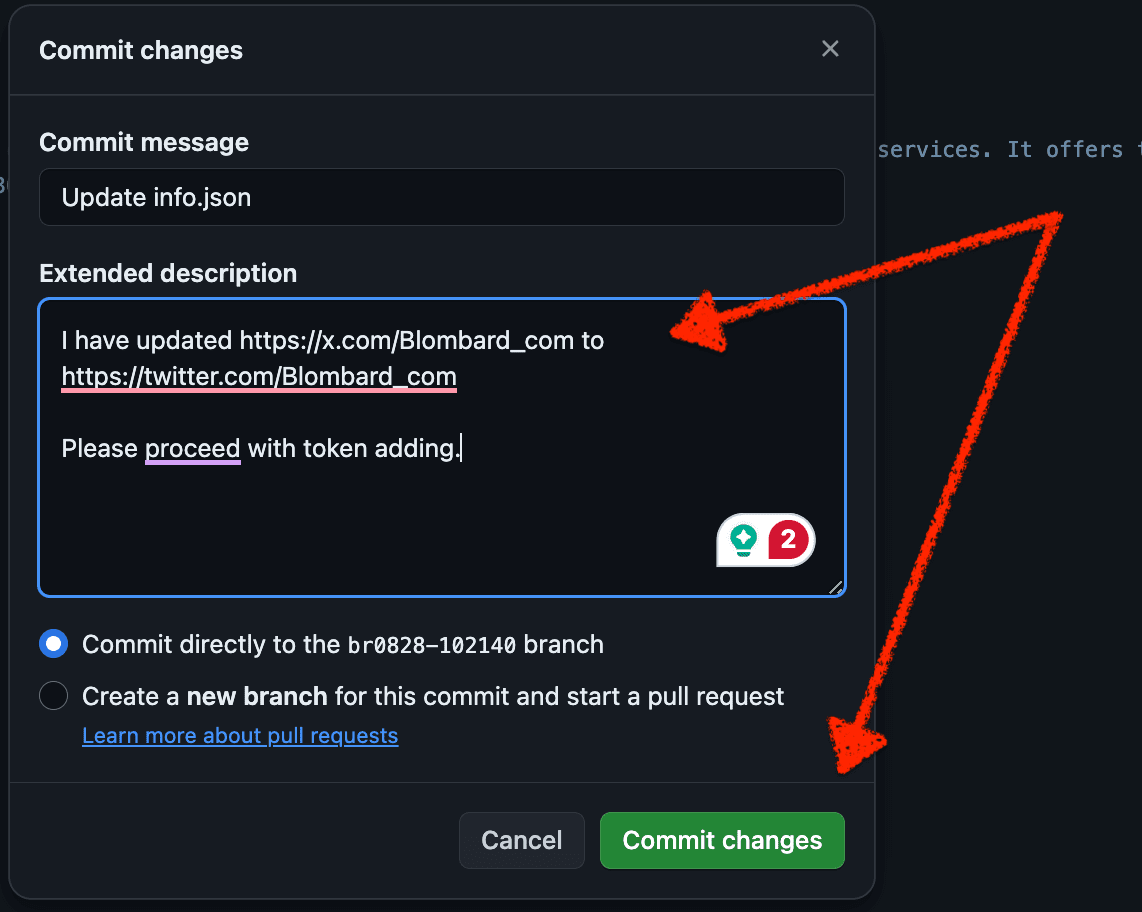
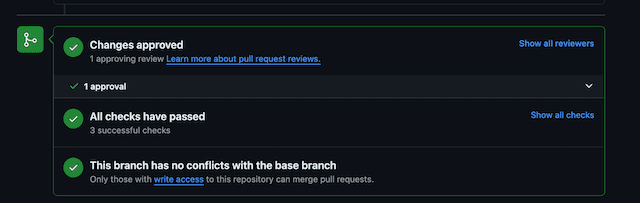
Important: the current schema supports the link type x, so an official https://x.com/... URL can be valid. Fix only the field named in the current error message. When all checks are green, wait for the payment bot and the human review.
Step 5. Payment and discussion
Your pull request will contain the discussion and the payment instructions. Read the newest message from the official merge-fee-bot. Pay only the exact asset, amount, network, address, and memo shown there. Then wait for the bot and a maintainer to reply in the same GitHub thread. This example of real pull request shows the basic flow.
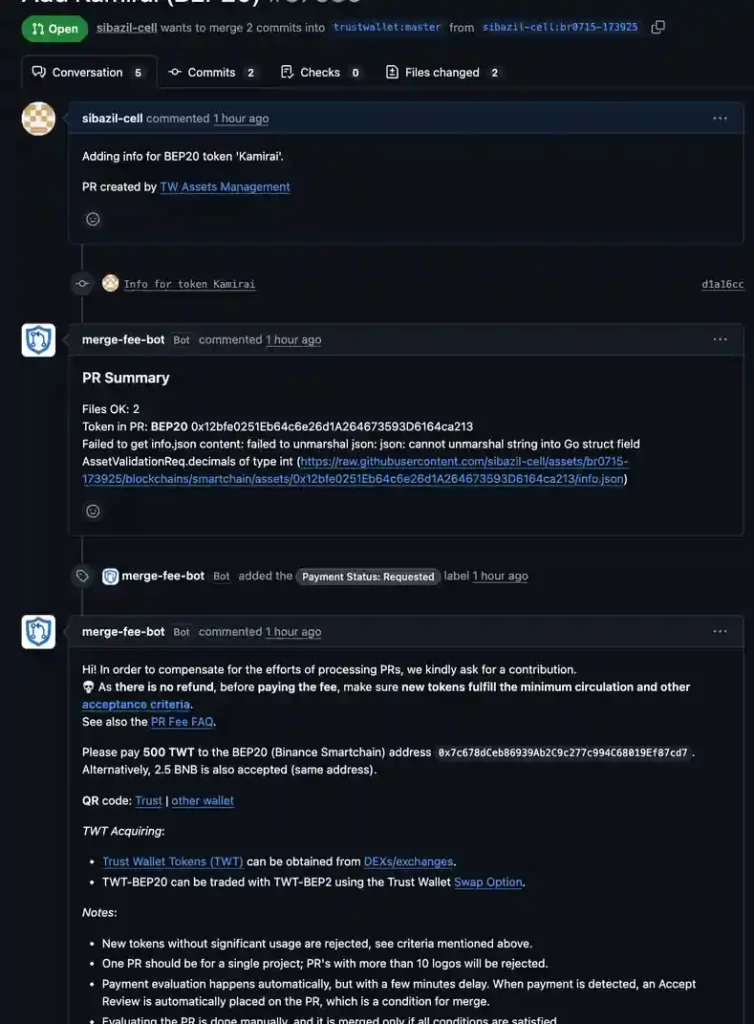
The current fee is 500 TWT or 2.5 BNB per pull request. TWT is available as a BEP20 token: https://bscscan.com/token/0x4b0f1812e5df2a09796481ff14017e6005508003. Do not use the old BEP2 payment steps. The payment bot normally detects a correct payment quickly and adds a payment review to the PR. Bot approval only confirms the payment. But, it does not mean that the token is accepted.
Update: July 2026. The listed fee is 500 TWT or 2.5 BNB. Payment is non-refundable and does not guarantee a merge. Use only the instructions posted by the official bot in your own pull request. A missing memo or a wrong address can make the payment unusable.
Trust wallet on Github: “This branch is out-of-date with the base branch.”
A green check means that the automatic tests passed. It does not mean that Trust Wallet accepted the token. You do not need to change the branch every day. If GitHub says “This branch is out-of-date with the base branch” and shows an “Update branch” button, you may use it once to bring the latest repository changes into your PR. Then let the checks run again.

Updating the branch can restart the automatic checks. It does not move your request ahead of other projects and does not replace the human review.
What to Do If Your Pull Request Goes Quiet?
There is no official review deadline. A paid pull request may be decided in a few days, may take several weeks, or may stay open longer. Do not post every day. If there is no human reply after about seven to ten days, leave one polite message inside the same PR thread:
Hello. The payment is confirmed and all checks are passing. Could a maintainer please review this request when possible? Thank you.A maintainer may send a due diligence checklist. Prepare short answers with public proof. Reviewers often ask about these points:
- Token purpose & benefit for Trust Wallet users — a concise mission statement and the wallet-level utility (payments, staking, governance, etc.).
- Distribution & airdrops — describe past or planned airdrops, tokenomics, vesting, and link to a whitepaper or official tokenomics page.
- Centralized-exchange listings — name the CEX and paste the direct trading pair URL.
- Decentralized-exchange listing with locked liquidity — supply the DEX pair explorer link, plus the liquidity-lock transaction hash.
- CoinMarketCap status — link your CMC page; if not yet listed, explain why and note your submission date.
- Security audit — provide a public report from a reputable audit company and make sure it matches the submitted contract.
- Team transparency — provide public founder profiles (LinkedIn, website) or a clear reason for temporary anonymity and a timeline for future doxxing.
Include proof for each answer, such as an explorer page, audit report, liquidity-lock record, exchange page, working product page, or white paper. Reviewers may also ask for a clear user journey and proof that the token has real use outside its own website. Honest and complete answers help the maintainer make a decision, but they still do not guarantee approval.
Step 6. Merge
After payment, a maintainer checks the project, token data, security, activity, and public proof. If the project passes the review, the maintainer merges the pull request. A closed pull request without a merge means that the token was not added through that request. The fee is not returned in either case.
Check the results
Apart from searching inside the wallet app on your smartphone, you can check your token in the browser https://assets.trustwallet.com/ and click Search in the upper menu. Then, enter the token’s contract address (or symbol) and press the “Search” button.

Waiting time
After a successful merge, Trust Wallet apps may keep the old image in cache for a few hours. Clear the app or browser cache first. Reinstall the wallet only if needed, and back up every wallet safely before you reinstall. Never share a recovery phrase with anyone.
Coin Price on Trust Wallet: Fixing Missing Token Price
Trust Wallet gets token price data from CoinMarketCap. For a price to appear, the correct contract address must be connected to the token’s CMC page, and CMC must have enough market data and transaction volume for that token. A Trust Wallet asset merge adds token information and a logo, but it does not create a price feed. Check the CMC contract mapping, active markets, and app cache if the price is missing. Similarly, if you want your asset’s logo and USD price to display in Coinbase Wallet, follow our dedicated Base‑app guide.
For many stablecoin teams, a blank price can confuse users. Explain that the token balance and the market price are separate data points, and fix the CMC mapping as soon as possible.
Why is My Token Price N/A in Trust Wallet?
Trust Wallet can get a token logo and basic information from the Assets repository. Price data comes from CoinMarketCap instead. The correct contract address and enough transaction volume must be present on CMC before the price can appear.
Common Reasons Trust Wallet Not Showing Token Price
A price may be missing because the token has no CoinMarketCap listing, the contract address is wrong, the market data is too weak, the app cache is old, or one chain in a multi-chain project is not mapped correctly.
Swipe left or right to view the entire table.
| # | What you see | Likely cause | What to do |
|---|---|---|---|
| 1 | The CMC page exists, but the price is blank | The contract address is missing or wrong on CMC | Ask CMC to add or correct the contract address |
| 2 | There is no CMC listing | Trust Wallet has no CMC price source for the token | Apply for a full CoinMarketCap listing |
| 3 | The address is correct, but the price is still missing | CMC does not have enough current market data or volume | Build real liquidity and volume on markets tracked by CMC |
| 4 | CMC shows the price, but the wallet does not | The app may still use cached data | Wait a few hours, then clear the cache if needed |
| 5 | Only one chain shows the price | Other contract addresses are not mapped on CMC | Add every official chain address to the CMC listing |
Token Not Listed on CoinMarketCap
Your token needs a CoinMarketCap listing before Trust Wallet can receive its CMC price data. Without that source, the wallet may show a dash or no price.
Incorrect Contract Address on CMC
Even when the token is listed, the contract address on CMC must match the address used in Trust Wallet. If it is missing or wrong, send a contract update request to CoinMarketCap. CMC does not promise the same processing time for every request.
Low Trading Volume or Liquidity
CoinMarketCap needs enough current market data and transaction volume to calculate a useful price. There is no fixed Trust Wallet dollar threshold in the current official rule. Build real liquidity and organic trading on markets that CMC tracks. If the data is active but the price is still missing, contact CMC.
Cache Delays
Trust Wallet apps can cache data for a few hours. Wait first, then clear the cache if the old value remains. Reinstall only as a last step. Before reinstalling, make sure you have a safe offline backup of every recovery phrase. Never send that phrase to support or enter it on a website.
Multi-chain Tokens
For a multi-chain token, CMC must list every official contract address. If CMC shows only the Ethereum address, the BNB Smart Chain version may have no price in Trust Wallet. Check each chain separately.
Trust Wallet doesn’t show the price and logo for all addresses if a token runs on multiple chains: how to fix?
One project can have contracts on several chains, such as a BEP20 token on BNB Smart Chain, an SPL token on Solana, and a TRC20 token on TRON. Trust Wallet treats each contract as a separate asset. Each chain address needs its own correct metadata and mapping. Adding one contract does not automatically add the logo or price to the other contracts.
Best Practices to Maintain Token Price on Trust Wallet
Keep the CMC listing, contract addresses, and markets accurate. Monitor the price on every supported chain and explain temporary data problems to your community. Update the Trust Wallet asset files only when the public token information really changes.
Maintain Good Liquidity and Volume
Keep healthy market pairs and real, steady trading activity. Do not create fake volume. Trust Wallet does not publish a fixed dollar amount that guarantees price display.
Multi-source Visibility
CoinGecko, DexScreener, and GeckoTerminal can help users check the market, but Trust Wallet’s current official price requirement is based on CoinMarketCap. Treat the other trackers as extra visibility, not as a replacement for CMC.
Automated Monitoring
You can use a simple monitor to check whether the CMC page still shows the correct contract and price. An alert can help you find a mapping problem early.
GitHub Assets Updates
Submit a new asset update only when the logo, name, website, or contract information really changes. Trust Wallet currently charges the processing fee again for an external update pull request. A contract migration needs clear public proof and may require the old contract to be deprecated.
Clear Community Communication
Tell token holders when a price or logo update is still syncing. Give them the official contract address and simple safety steps. Never ask users for a recovery phrase or private key.
Quick Checklist to Solve Token Price Issues on Trust Wallet
- CMC Listing: Check if your token has an active page on CoinMarketCap.
- Contract Mapping: Confirm the correct BEP-20 address on your token’s CMC page.
- Liquidity & Volume: Check that CMC receives enough current and real market data.
- Cache Clearing: Wait a few hours, then clear the Trust Wallet cache if needed.
- Escalation: If the mapping is wrong, contact CoinMarketCap. If the Trust Wallet asset data is wrong, use the official Trust Wallet support or asset update process.
These checks cover the most common reasons why a Trust Wallet token price is missing.
Rapid Health Check
Use the real-time token mood line before any treasury move, staking update, or burn event. Align actions with sentiment to avoid backlash. This quick check acts like a safety net for governance choices.
Other ways to improve altcoin
- Hence, fast‑track your CoinCarp appearance without incurring any fees.
- Apply a simple strategy: showcasing your token’s cost in the MetaMask.
- Similarly, unravel the global economic metamorphosis by cryptocurrencies.
- Additionally, meet ChatGPT’s Crypto AI Leap.
- Elevate your token’s presence on Coinpaprika. 🌶️
- Enlist an asset on the Coinranking.
- Push your altcoin onto BitDegree’s tracker.
- Announce your coin on Coindar at no cost.
- Also, add a currency to CoinLore.
- Learn everything you need to know about token listing on CoinGecko with this ultimate guide. 🦎
- Ultimate guide that helps you list your token on CoinMarketCap quickly.
- How to Add coin logotype to Metamask. 🦊
- How to get circulating supply, market cap, and rank on CMC.
- The ultimate guide to updating Etherscan and Bscscan.
- How to speed up updating on Bscscan and Etherscan.
- Make a currency visible on Coinbase.
- In addition, list a token on Binance at no cost.
- Free listing on one of the top exchanges.
- Rent liquidity for passing CMC and Coingecko.
- Learn how to make great cryptocurrency.
- Grow liquidity on PancakeSwap and Uniswap.
- Get dynamic coin price & total market cap on BscScan and Etherscan.
- Put an asset to Blockspot.
- Besides, list a currency on CoinCost.
- Push a coin to DigitalCoinPrice.
- Add a currency to the Coindataflow.
- Then, add altcoin to the CoinCheckup.
- Also, place an asset on LiveCoinWatch.
- After that, add an altcoin to the CoinCodex.
- Also, list a token on the best Coin-Voting apps.
- Then, make a token’s logo visible on MEW (MyEtherWallet).
- In addition, add a currency to the Trezor wallet.
- Improve Circulation Supply to increase market cap and rank.
- Finally, place the Bank Card button on your website.