
SafePal listing is not one button. That is the first thing a founder should understand before opening a submission form, posting a community announcement, or promising that a token will suddenly appear with a logo, price, swaps, and buy support. In practice, SafePal visibility has several layers. A token can be usable in the wallet, searchable in the asset database, manually addable by holders, mapped to price data, supported by swap routes, or promoted through a separate DApp or campaign path. However, those outcomes do not all come from the same request.
This guide shows how to list a token on SafePal Wallet without turning a useful visibility step into a confusing promise. You will see what to prepare before submission, how to think about EVM contracts and Solana mint addresses, what to tell holders while the request is under review, and why price display is a separate data problem. In addition, you will get a founder checklist that helps your team decide whether the token is ready for SafePal or whether market-data cleanup should happen first.
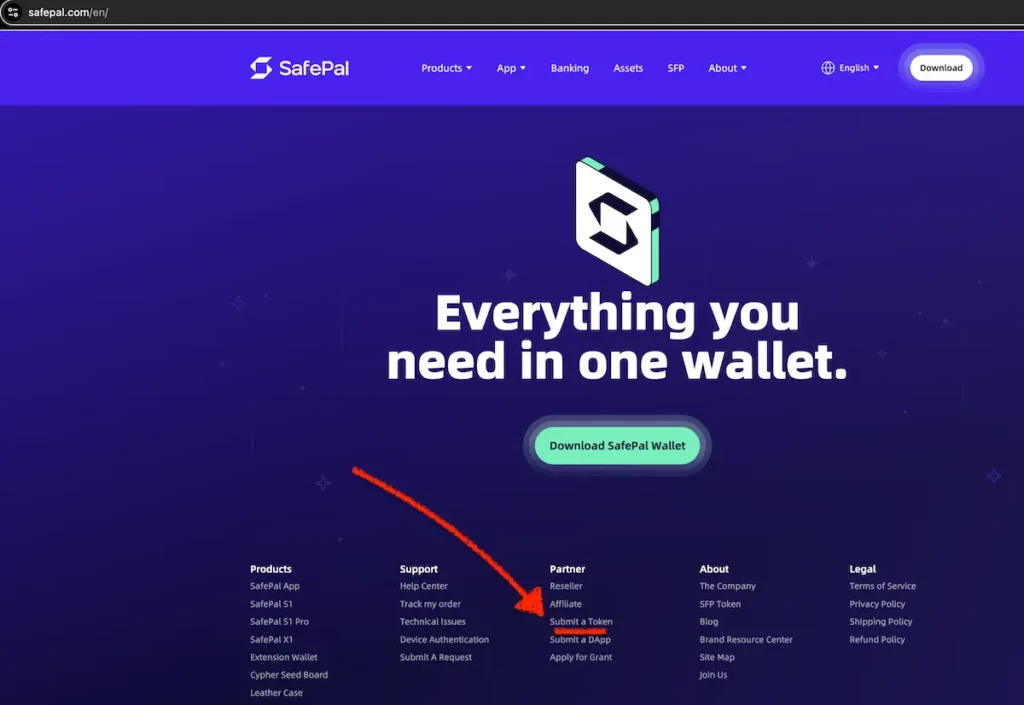
According to the supplied SafePal research, SafePal has an official Token Submission Form. To open that form go the SafePal main page and click on the Submit a Token form (as image below shows). The same research says the form currently lists Ethereum, Binance Smart Chain, Tron, Solana, Base, Polygon, Arbitrum, and Other as network choices, and that requests are processed within three business days. It also says SafePal does not send a notification email after the token is added. Therefore, your team should submit, wait through the review window, and then search inside SafePal directly instead of waiting for a confirmation email.
The four different jobs hiding inside SafePal listing
The phrase “SafePal listing” usually hides four different jobs. First, there is basic technical compatibility: can users hold or view the asset on a supported chain? Second, there is search discoverability: can ordinary users find the token by name or contract in SafePal? Third, there is market-data display: does the token show a live price, chart, or fiat value? Finally, there is distribution: does the project get DApp placement, homepage visibility, campaign support, or other promotional exposure?
That separation matters because a founder can solve one layer and still have a holder-facing problem in another layer. For example, SafePal users may be able to add a token manually while the token is not yet searchable. Similarly, the token may be searchable but still have no live price because the price source is missing or not mapped. If your team needs a broader comparison, Tokpie’s OKX Wallet token visibility guide explains the same multi-layer problem for another major wallet.
What SafePal asks for before it can review your token
The practical work starts before the form. SafePal’s current public submission flow asks teams to choose the token network from Ethereum, Binance Smart Chain, Tron, Solana, Base, Polygon (Previously Matic), Arbitrum, or Other. It then asks for the token name, token contract address, token icon link in 120x120px JPG or PNG format, the number of active wallet addresses, a blockchain explorer URL, whether the token is listed on CoinMarketCap or CoinGecko, and audit information when available. If the token is listed on CoinGecko, the form asks the team to share that link. For audits, SafePal asks for URL links instead of PDF files because it does not open PDFs for security reasons.
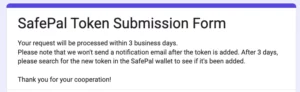
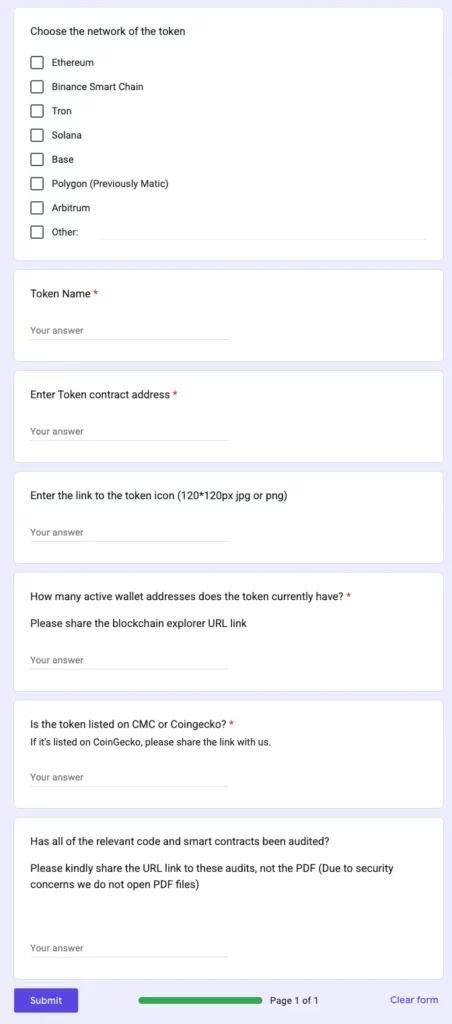
Those fields reveal what a reviewer needs to see quickly: identity, authenticity, user adoption, explorer verification, market-data context, and security transparency. The form also says requests are processed within three business days and that SafePal will not send a notification email after the token is added. Therefore, after three days, the project team should search for the token directly in the SafePal wallet. However, the form fields should not be read as a guaranteed scoring rubric. SafePal may change requirements, and the public form does not promise approval. Use the fields as a preparation checklist, not as a contract.
| Item | What to prepare | Why it matters |
|---|---|---|
| Network | Choose Ethereum, Binance Smart Chain, Tron, Solana, Base, Polygon (Previously Matic), Arbitrum, or Other. | SafePal token support depends on chain context, not only token branding. |
| Token name | Enter the official token name exactly as it appears on your website, explorer, and market-data pages. | A consistent name helps reviewers and holders avoid confusion with duplicate or impostor assets. |
| Contract or mint address | Use the verified contract address for EVM tokens or the mint address for Solana tokens. | This is the identity SafePal and holders use to avoid impostor assets. |
| Icon URL | Host a stable 120x120px JPG or PNG logo URL. | Broken image hosting makes the asset look unfinished and slows review. |
| Active wallet addresses and explorer URL | Provide the current number of active wallet addresses and share the blockchain explorer URL. | This gives SafePal a quick signal of real holder activity and lets reviewers check the token on-chain. |
| CoinMarketCap or CoinGecko status | State whether the token is listed on CoinMarketCap or CoinGecko. If it is listed on CoinGecko, share the link. | SafePal price display can depend on external market-data sources. |
| Audit URL | If the relevant code and smart contracts have been audited, provide URL links to the audits instead of PDF files. | SafePal says it does not open PDF files because of security concerns. |
How to prepare by chain without confusing identifiers
For Ethereum, Base, Arbitrum, Polygon (Previously Matic), Binance Smart Chain, and other EVM-compatible networks, your main identifier is the token contract address. So, for example, for Tron, use the TRC20 token contract address. For Solana, use the token mint address as the practical identifier.
Also, before submitting, confirm that the explorer page shows the correct token name, symbol, decimals, and contract information. Also, make sure your official website, social profiles, token icon, and explorer details do not conflict. If SafePal reviewers or holders see different names, broken icons, or mismatched symbols, the token may look less trustworthy even if the contract itself is valid.
For BNB Smart Chain tokens, metadata hygiene is especially visible because many founders use BSC as a first exchange and wallet-readiness lane. If your team is also preparing broader wallet visibility, compare SafePal preparation with Tokpie’s Trust Wallet token logo and price guide. The requirements are not identical, but the same principle applies: clean public identity, market-data readiness, and realistic user communication matter more than a loud announcement.
For Solana projects, the practical identifier is the token mint address. The supplied research explains that a Solana token’s mint address is the unique identifier used across wallets, applications, and explorers, and the mint stores core fields such as decimals. Therefore, your SafePal preparation pack should include the mint address, the Solana explorer link, the correct logo URL, and consistent token identity. If you are preparing a Solana token for tracker visibility too, use Tokpie’s Solana CoinMarketCap and CoinGecko listing guide as a companion checklist.
For Tron, non-EVM chains, or networks selected through Other, be more careful. Token submission is not the same as new chain integration. SafePal has historically announced new blockchain integrations separately, according to the supplied research, which suggests that unsupported base-chain coverage can be a platform-level decision. In other words, do not tell your community that SafePal support is coming only because you submitted a token that lives on a chain SafePal may not yet support natively.
Why price display, swaps, buy support, and promotion are separate
A token can be visible in a wallet and still show no price. That is frustrating for holders, but it is not unusual. The supplied SafePal research says token prices in the app rely on external sources including Binance, DeBank, and CoinGecko. Consequently, missing price display may mean the wallet database is not the blocker. The blocker may be market-data coverage, exchange mapping, liquidity quality, or token identity mismatches across data providers.
This is where founders often mix up wallet work and tracker work. If your token is not yet recognized by major market-data providers, prepare that layer separately. Tokpie’s CoinMarketCap listing guide is useful when CMC visibility is the missing dependency, while the Exodus Wallet listing and live price guide shows how wallet display often depends on identity, logo, and market-data mapping rather than one submission alone.
Swap support and buy support are also different lanes. SafePal’s public assets directory, available at the official SafePal assets page, separates wallet support, buy support, and swap support. That matters because founders sometimes announce “SafePal listing” as if it means every in-app function is available. However, wallet search, price display, swap routing, fiat buy access, and promotional placement can each depend on different product decisions, partners, liquidity paths, and risk checks.
SafePal listing checklist before you submit
Before opening the form, make the submission easy to review. Start with identity. Confirm the official token name, symbol, decimals, contract or mint address, chain, explorer URL, website, social links, and logo URL. Then, check consistency. The same token should not appear with different names across the website, explorer, CoinGecko, CoinMarketCap, DEX pages, or social profiles. Additionally, store your audit link, market-data links, and active-address estimate in one internal document so the person submitting the form does not improvise under time pressure.
- Confirm the base chain is supported or clearly selectable in the current SafePal form.
- Verify the contract address or Solana mint address on a public explorer.
- Prepare a stable 120×120 JPG or PNG icon URL.
- Check whether CoinMarketCap or CoinGecko already show the token correctly.
- Prepare a public audit URL if the project has an audit.
- Estimate active wallet addresses honestly and avoid inflated numbers.
- Write holder instructions for custom-token import before the community asks.
- Plan a post-submission check because SafePal may not send an addition email.
After that, decide what you can safely announce. A careful statement might say that the team submitted the token for SafePal review and will update holders after checking the wallet directly. It should not say the token is fully listed, priced, swappable, buyable, or promoted unless your team has verified each outcome. This caution protects credibility. Moreover, it reduces support tickets because the community hears a precise status instead of a broad claim that later needs correction.
What to tell holders while the request is under review
While the request is under review, holders still need practical help. SafePal’s support content, according to the supplied research, allows users to add many supported tokens manually when the asset is not discoverable in search. The custom-token fallback uses explorer-derived details such as contract address, token name, symbol, and decimals. Therefore, your team should publish a short holder note with the exact network, verified contract or mint address, official explorer link, and a warning to avoid lookalike assets.
That holder note should be boring in the best way. It should not include price predictions, hype, or pressure to buy. Instead, it should help users avoid mistakes. For example, tell holders to copy the address only from the official website or explorer, confirm the network before adding the token, and ignore private messages offering “support.” Besides, if the token is not yet priced, say so plainly and explain that price display can require separate market-data coverage.
When exchange and market-data readiness become the next bottleneck
SafePal visibility often exposes a bigger readiness question: can outside platforms verify your token without detective work? If the explorer page is incomplete, the logo URL breaks, the project lacks exchange markets, or CoinMarketCap and CoinGecko do not map the token cleanly, SafePal may not be the only place where holders see a weak profile. In addition, the same weaknesses can affect other wallets, trackers, and listing conversations.
If your next blocker is exchange or market-data coverage, solve that before making bigger visibility claims. Tokpie can help token teams create a tradable market and prepare the data layer that trackers and wallets often need to understand a project. Still, the right sequence matters. Use SafePal submission when your token identity is clean. Use exchange, tracker, and liquidity preparation when your project needs stronger market-data signals before wallet price display can feel reliable.
The final lesson is simple: submit the form, but manage the system. SafePal’s form is one route into asset discoverability. However, holder experience depends on identity, explorer data, market-data providers, chain support, and product-specific wallet features. When those layers are prepared in the right order, your team can communicate with more confidence and fewer corrections.
Alternative wallets where token teams can build visibility
SafePal should also sit inside a broader wallet visibility plan. For EVM projects, Tokpie covers MetaMask token logo and MetaMask price display, plus GitHub-style metadata routes for Trezor and MyEtherWallet. For ecosystem-specific wallets, Solana teams can use the Phantom token logo and price guide, TRON teams can follow the TronLink logo and price guide, and Base or ERC-20 teams can review the Coinbase Wallet and Base app guide. In addition, Trust Wallet, Exodus, and OKX Wallet each have separate Tokpie guides because they treat logo, price, supported-asset status, liquidity, and risk signals differently. Therefore, use SafePal as one wallet lane, but keep a cross-wallet checklist so your token identity, explorer data, logo files, tracker listings, and liquidity evidence stay consistent everywhere.
FAQ about listing a token on SafePal Wallet
Does SafePal have an official token submission form?
Yes. The supplied research identifies an official SafePal Token Submission Form. Before publishing or submitting, preview the current form directly because fields and supported networks can change.
How long does SafePal token submission take?
The supplied research says the current form states that requests are processed within three business days. However, that does not guarantee approval, search visibility, price display, or promotion.
Will SafePal email us after the token is added?
The supplied research says SafePal does not send a notification email after the token is added. Therefore, check the wallet directly after the review window.
Can holders add the token manually before it is searchable?
Often, yes, when the token is on a supported network and users have the correct explorer-derived metadata. Give holders the verified contract or mint address, network, name, symbol, decimals, and explorer link.
Why does a SafePal token show no price?
Price display can depend on external data sources and mapping. The supplied research names Binance, DeBank, and CoinGecko as SafePal price-data sources, so missing price may require market-data cleanup.
Does SafePal token listing include swap support or buy support?
Not automatically. SafePal’s asset view separates wallet support, swap support, and buy support. Treat those as separate outcomes and verify each one before announcing it.
What should Solana projects enter as the token address?
For Solana projects, use the token mint address as the practical identifier and include a clean Solana explorer link. Also, confirm decimals and logo metadata before submitting.