
Uniswap is one of the most popular decentralized exchanges (DEX). As a result, having your token recognized with a proper logo on this platform significantly boosts both credibility and visibility. However, Uniswap does not host or manage token logos directly. Instead, it relies on curated token lists maintained by various organizations and communities. In this article, you’ll discover how to get your token logo displayed on Uniswap, along with practical tips on expanding your token’s reach to other leading platforms—ultimately strengthening your project’s overall reputation.
Understanding Token Lists
A token list is a JSON file containing essential details about various tokens. Common fields include:
- Contract Address
- Symbol
- Name
- Decimals
- Logo URL
These lists follow the Token Lists standard to ensure consistency. When users enable a specific list in the Uniswap interface, any tokens in that list display their details, including the logo.
Why Token Logo on Uniswap Matters?
Your logo gives potential investors a clear visual cue. Moreover, it builds trust by signaling professionalism and legitimacy. Therefore, a high-quality logo can help distinguish your token from the crowd. Also, it reduces confusion between similar tokens.
- Professional Appearance: A clear, high-quality logo stands out and helps attract potential investors.
- Brand Trust: Visual branding fosters trust and can reduce confusion with similarly named tokens.
- Better Credibility: Having your logo on Uniswap signals that your project is proactive and serious about transparency.
If you plan to expand beyond Uniswap, you should also look into the ultimate guide for listing on CoinMarketCap to increase your project’s reach. This step is crucial for gaining more credibility in the competitive DeFi landscape. Also, discover reputable token auditors’ costs.
Step-by-Step: Adding Your Token Logo to Uniswap
Choose the Right Token List
Uniswap does not store logos directly. Instead, it refers to third-party lists (like CoinGecko’s list, community-run lists, or the Uniswap default list). Each list has different listing criteria:
- Uniswap Default List: Strict requirements, higher visibility.
- CoinGecko List: Automatic updates if your token is listed on CoinGecko.
- Other Curated Lists: Managed by DeFi communities and specialized platforms.
If you plan on eventually featuring your token on high-profile trackers, explore how to list your token on Binance for free or even list it on Coinbase’s data website. Each listing opportunity can contribute to your token’s visibility and trading volume.
Prepare Your Token Information
Gather all the required data well in advance:
- Token Contract Address: Make sure it’s verified and accessible.
- Token Name and Symbol: Must match your smart contract.
- Decimals: Accurately represent how many decimal places your token uses.
- High-Quality Logo: It should be a square image. Store it in a reliable repository such as GitHub or IPFS for constant availability.
- Project Links: Official website, social channels, and, if applicable, your CoinMarketCap or CoinGecko page to prove legitimacy.
Submit a Pull Request to the Token List
Most token lists reside on GitHub:
- Fork the Repository: Go to the GitHub repo of the token list you want to join.
- Edit the JSON File: Add your token details (contract address, symbol, name, decimals, logo URL) according to the list’s submission guidelines.
- Open a Pull Request: Provide all necessary evidence that your token is authentic.
- Communicate: Respond promptly if maintainers ask for additional info or corrections.
For example, if you also want your token to appear on other data platforms, follow these step-by-step guides for CoinPaprika, CoinCodex, CoinCheckUp, or CoinDataFlow to further broaden exposure.
Verify Your Token on Uniswap
Once your pull request is approved and merged:
- Enable the List: Go to the Uniswap interface, click “Manage Token Lists,” and toggle on the list you just updated.
- Search for Your Token: Enter the contract address or token name. If everything is correct, your token and logo will appear.
- Community Adoption: Remind your users to enable the same token list so they can also see the logo.
Adding a Logo to Uniswap’s Default List
If you specifically want to be on Uniswap’s default list, you must create an issue on the official GitHub repository. Usually, they’ll request:
- Token Address
- Token Name
- Decimals
- Symbol
- Uniswap V2 Pair Address
- Official Homepage Link
- Link to CMC or CoinGecko Page
For example, if you want to add a token logo to Uniswap via Uniswap’s default list, create a new issue on GitHub. Provide the following information:
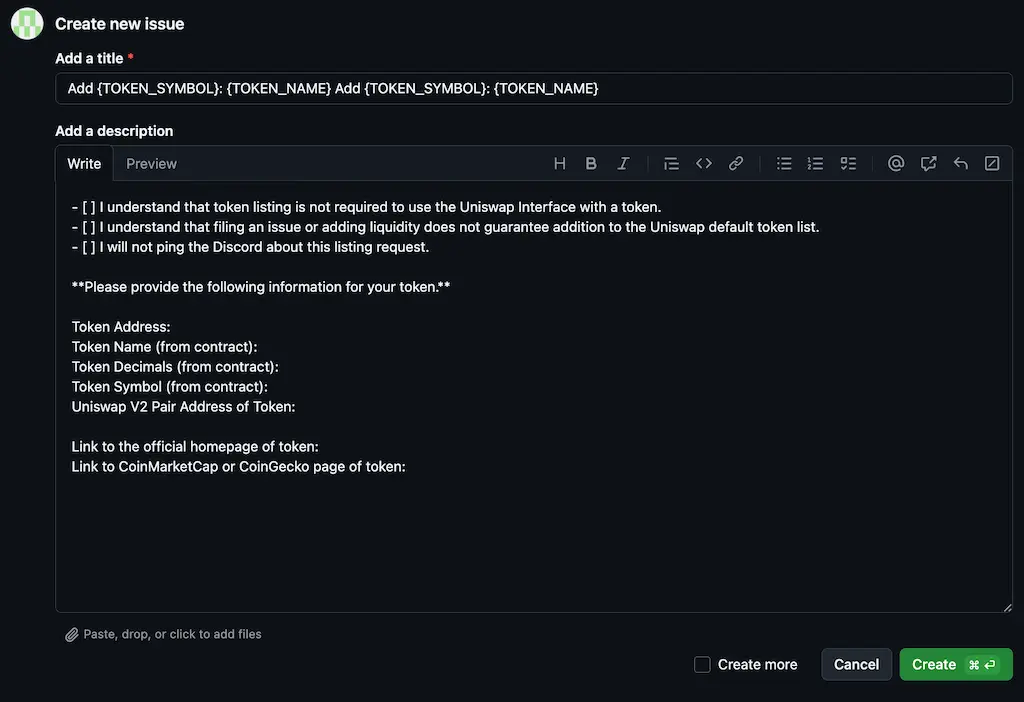
After submission, your request appears in the “Pulls” tab. Approval can take time, so prepare all required details to speed things up. Meanwhile, you might also consider showcasing your token on LiveCoinWatch, one of the well-known top coin-trackers in the industry.
Extra Tips for Token Logo Management
- Maintain Consistency: Ensure your logo and metadata remain consistent across all platforms—websites, social channels, and exchanges.
- Use Reputable Storage: Host the image on GitHub or IPFS to avoid dead links.
- Update Regularly: If anything changes (like a contract upgrade or rebranding), promptly update your token list entries.
- Stay Visible: Consider featuring your project on event calendars like Coindar to announce key milestones (e.g., new partnerships, and technology developments).
Expanding Your Token’s Visibility Beyond Uniswap
Listing on Major Trackers
After successfully displaying your token logo on Uniswap, the next strategic move is to get listed on major cryptocurrency data aggregators:
- CoinMarketCap: The biggest crypto tracker—being listed here can significantly boost your project’s credibility.
- CoinGecko: Another leading platform with valuable analytics for investors and traders.
- CoinPaprika: A growing aggregator focusing on research insights.
- CoinCodex: Popular for real-time crypto charts and data.
- CoinCheckUp: Offers detailed analysis and fundamental metrics.
- CoinDataFlow: Highlights market trends and advanced metrics.
- LiveCoinWatch: User-friendly interface for price tracking and portfolio tools.
- CoinRanking: Straightforward ranking system for quick overviews.
- Blockspot: A comprehensive crypto database that enhances discoverability.
- DigitalCoinPrice: Known for analytics, news, and price forecasts.
- CoinLore: Focuses on easy-to-interpret market data.
- Bitdegree: Make your altcoin visible to new potential buyers.
- Coincost: The relatively new coin-tracking resource.
- CoinCarp: Achieve broader reach by joining CoinCarp’s database at zero cost.
Each tracker has its own submission requirements. Ensuring a consistent token logo, symbol, and contract address across these platforms significantly improves brand trust.
Getting on Centralized Exchanges
While DEXs like Uniswap are essential, centralized exchanges (CEXs) can open doors to broader audiences. Consider:
- Tokpie Exchange: A user-friendly CEX that supports emerging projects. Check its simple three-step listing process.
- Liquidity Services: If you need help stabilizing trading volume, leverage liquidity outsourcing to keep spreads tight.
- Bank Card Integration: Enhance adoption by adding a bank card or Apple Pay button to your website.
Getting your token onto CEXs also helps meet the listing prerequisites for Binance and Coinbase.
Optimizing Wallet Integration
Besides Uniswap, ensure your token looks professional in popular wallets:
- MetaMask: One of the most widely used Web3 wallets.
- Trust Wallet: A key multi-chain wallet with a vast user base.
- Trezor: Great for hardware storage, appealing to security-focused investors.
Having a recognizable logo in these wallets aligns with the brand consistency you’re aiming for on Uniswap. In addition, you can use an advanced guide: token price display setup on the MetaMask.
Joining Top Voting Platforms
Building momentum often requires active promotion:
- Top Token Voting Platforms: Showcase your project to wider communities who can upvote or endorse it.
- Fundraising DApps: Explore Tokpie’s Token Listing & Fundraising for additional resources.
- Project Visibility: Refer to the ultimate guide on making a successful cryptocurrency and learn how to integrate ChatGPT for blockchain projects to stand out with cutting-edge technology.
Leveraging Multi-Chain Deployment
To reach an even broader market, consider deploying your token on multiple blockchains:
- Ethereum & BNB Smart Chain: Classic options with high adoption rates.
- Solana: Known for high-speed transactions and low fees.
- Base Blockchain: A new ecosystem attracting a growing user base.
- Arbitrum: Layer-2 solution on Ethereum with fast and cheap transactions.
- Tron: Popular for content-focused decentralized apps.
- Polygon: A robust Layer-2 scaling solution on Ethereum.
If you’re building on The Open Network (TON), you can leverage DEXs like DeDust and TonSwap for TON-based tokens. Also, consider listing on the Tokpie CEX if you want extra liquidity and exposure for your TON altcoin.
Risk-Adjusted Planning
Scale spending only if the sentiment meter sustains above 50 for two reporting periods. This disciplined framework balances growth ambitions with treasury safety.
Investor Newsletter Gem
Include the founder outlook index in monthly updates to reassure stakeholders that you track macro mood. Consistent insights foster trust and invite further funding.
Conclusion
Uniswap relies on curated token lists to display token logos. By understanding these lists, preparing accurate token details, and submitting pull requests to reputable sources, you can get your token logo added to the Uniswap interface—enhancing both professionalism and user trust.
However, that’s just the beginning. Growing a successful cryptocurrency project means branching out to major crypto trackers, centralized exchanges, popular wallets, and potentially multiple blockchains. By following the step-by-step tips and leveraging resources—from adding your token’s logo to MetaMask to listing on CoinMarketCap—you can solidify your presence across the DeFi space and beyond.
Focus on meticulous branding, consistent data, and ongoing community engagement. This holistic approach will ensure your project stands out on Uniswap and everywhere else—earning the trust and attention it deserves.