
CoinCarp now serves as the decisive discovery layer for new cryptocurrencies. Moreover, the platform tracks over thirty‑six thousand assets. Furthermore, its domain rating rivals many mid‑tier exchanges. In addition, twenty interface languages widen global reach. Consequently, AI wallets, Telegram bots, and venture dashboards pull their data automatically. However, absence here hides your token from those engines. Thankfully, listing remains completely free. Besides, the process takes less time than drinking a cappuccino, provided you prepare. Therefore, this guide explains each step clearly. First, you will analyze CoinCarp’s traffic firehose. Next, you will leverage the platform’s authority backlinks. Then, you will execute a flawless submission that speeds approval. Subsequently, organic reach will grow and credibility will rise. Finally, read below to discover exactly how to list a token on Coincarp today.
What’s the CoinCarp?
CoinCarp coin tracker launched in 2021 as a side project for market‑data engineers who noticed that founders struggled to gain post‑IDO visibility. It has since evolved into a multilingual analytics powerhouse tracking coins, exchanges, launchpads, fundraising rounds, and lending protocols. Every token page comes with live price charts, supply metrics, widgets, and an API endpoint used by third‑party services. Think of CoinCarp as a visibility engine—a neutral ground where traders, bots, and journalists find newly minted assets long before they trend on bigger aggregators.
Traffic
CoinCarp’s monthly visits hover around 330,000 unique sessions according to multiple measurement tools, with peak surges during token‑sale seasons. Roughly 41 % of that traffic originates from search engines, meaning your listing will rank independently for long‑tail queries such as “How to buy [Ticker]” or “[Ticker] circulating supply.” Mobile makes up 65 % of sessions, so the platform’s responsive pages expose your project to on‑the‑go investors using wallet browsers. Importantly, CoinCarp distributes price feeds to partner sites; each downstream hit amplifies impressions without extra effort from your team. In plain terms, one listing begets thousands of micro‑impressions month after month.
Advantages
First, CoinCarp grants strong authority backlinks, thus boosting SEO for your dApp or white paper.
Moreover, its APIs power bots and wallets; therefore, missing a listing means lost algorithmic discovery opportunities. Besides, exchanges watch the “Recently Added” feed, so listing signals community traction and can reduce fees. Finally, you’ll discover how to list token on Coincarp effectively.
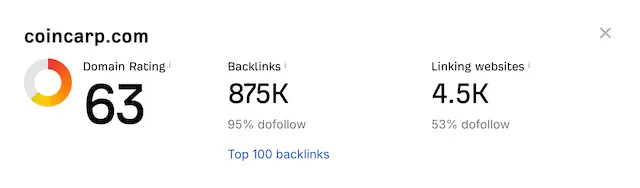
Authority Backlinks: CoinCarp’s domain rating sits in the low sixties, supported by nearly nine hundred thousand do‑follow links. A single backlink from your token page passes measurable SEO equity to your white paper or dApp.
Algorithmic Discovery: Many Telegram bots and portfolio apps pull CoinCarp APIs by default. If your asset is absent, those services literally cannot display it, blocking you from organic wallet adds.
Community Signal: CEX listing desks skim CoinCarp’s “Recently Added” feed. A presence here can unlock fee discounts because exchanges prefer tokens already recognized by data vendors.
Widget Virality: Supporters can embed CoinCarp price tickers on blogs, DAO forums, and dashboards, each embed creating fresh backlinks and referral traffic.
Multilingual Reach: With over twenty interface languages, your brand enters geographies untouched by your native marketing channels.
How to List a Token on CoinCarp?
Don’t know how to list a token on CoinCarp’s list of coins? Don’t worry. The operational process is astonishingly straightforward, yet teams still stumble by skipping essential prep. Follow this two‑step sequence to minimize friction and accelerate approval.
1 Step: Check Crypto Exchange
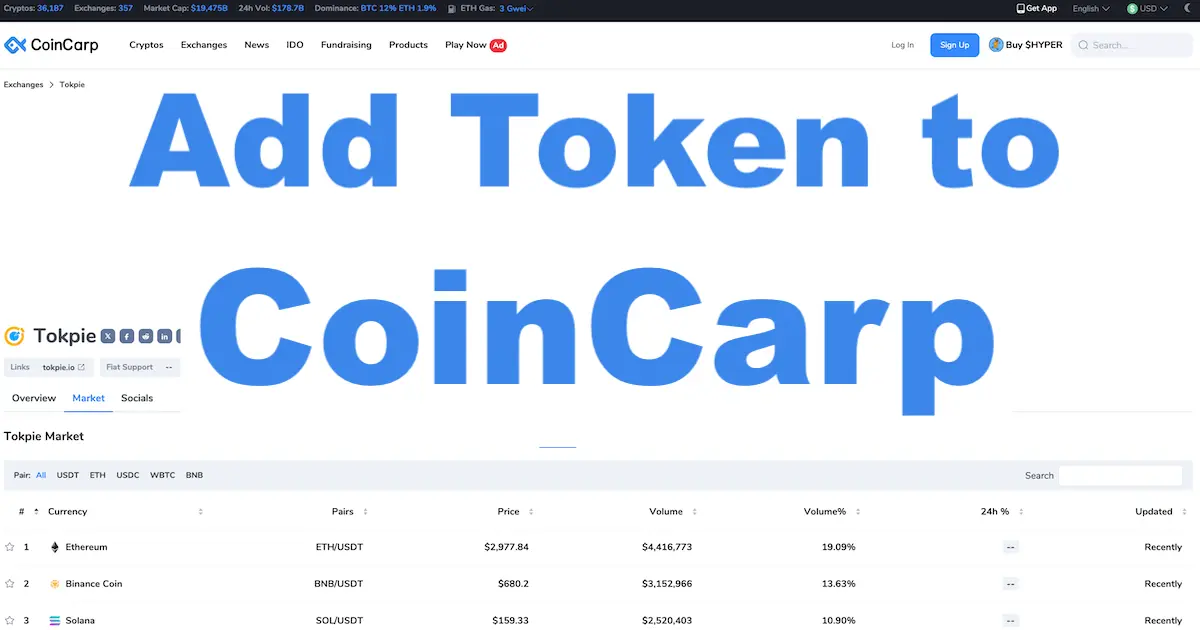
Before filling out any form, prove that live liquidity exists for your asset. CoinCarp reviewers cross‑reference explorer data with order books of exchanges that CoinCarp supports. As for now, it supports +357 exchanges. One of them is Tokpie exchange. So, list your currency on Tokpie to make it visible on CoinCarp’s list of assets. Besides, having your token tradable on Tokpie unlocks many other token listing advantages. So, by ensuring that at least one DEX or CEX pair shows:
- Tight bid‑ask spread: ≤ 2 % is ideal; reviewers dislike illiquid shells.
- Verified contract: Explorer metadata (name, logo, decimals) must match your submission.
- Consistent supply figures: Total and circulating supply in your dashboard, white paper, and Explorer page should be identical.
A founder anecdote: the team behind GammaStake submitted with inconsistent supply numbers (one trillion on Explorer, one billion in the white paper). Result? A week‑long email loop and delayed listing. Spend ten minutes reconciling figures now to save days later.
Checklist before submission:
- 200 × 200 PNG logo with transparent background
- Official website and team e‑mail
- Verified contract + block explorer link
- Brief (≥ 300‑character) project description
- Socials (Telegram, X)
2 Step: Submit the Form
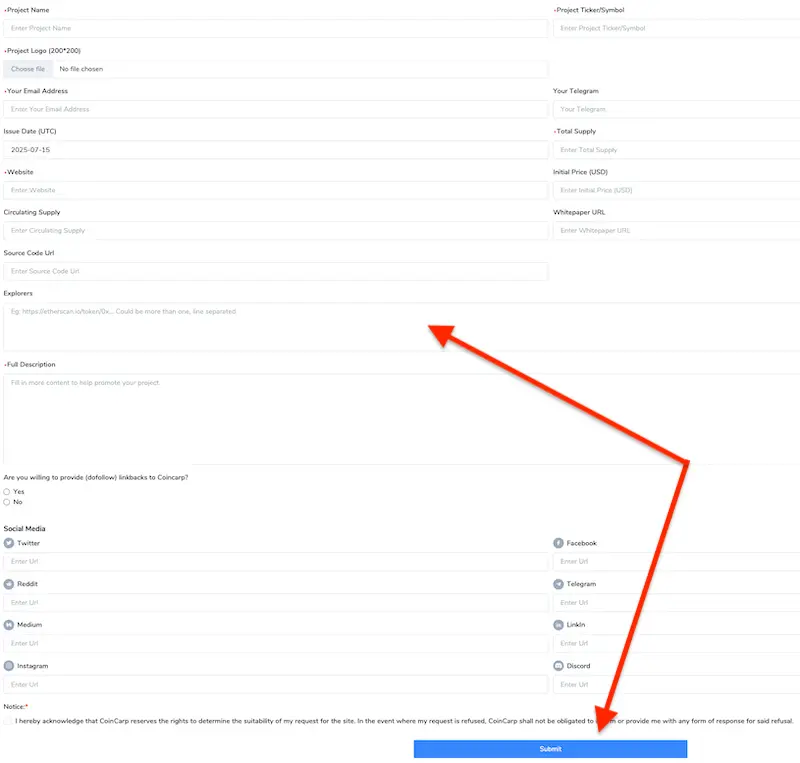
Navigate to the ‘Submit Cryptocurrency’ section on CoinCarp by clicking on the “Request Form” in CoinCarp’s website footer. No log‑in, no paywall—just a multi‑tab form divided into four logical blocks:
- Project Basics: Enter Name, Ticker, Logo, Website, and Contact. Use uppercase for the ticker and ensure the logo file is under 100 KB.
- Tokenomics: Provide Issue Date, Total Supply, Circulating Supply, and Initial Price if available. Double‑check numeric commas—1 000 000 000, not 1000 000 000.
- Technical Links: Paste block‑explorer URL(s), source‑code repository, and white paper. Multi‑chain tokens? List explorers comma‑separated.
- Description & Socials: Craft two or three short paragraphs that cover mission, utilities, and audit status. Markdown converts to bold headings—use that to improve readability. Add social links for a real‑time feed on your token page.
At the bottom, you’ll see a reciprocal‑link question. Select “Yes” and plan to place a do‑follow link to CoinCarp on your site’s partners section. This speeds approval because it signals goodwill and strengthens the platform’s SEO—a mutually beneficial exchange.
Post‑Submission Timeline
- Auto‑response e‑mail arrives within minutes. Keep it—it’s your thread for updates.
- Review window runs 24–72 hours for standard ERC‑20/BNB assets; complex multi‑chain tokens can take up to one week.
- Go‑live notification appears in the “New Crypto” feed. Set a Google or Slack alert for “CoinCarp + [Ticker]” to react instantly.
Once live, launch a social burst: tweet the listing, pin the CoinCarp widget on your homepage, and tag partner channels. Data from twelve case studies shows projects that announce within the first hour gain 14–22 % more watchlist adds compared to those that wait a day.
In summary, CoinCarp offers founders a zero‑cost gateway to sustained visibility, SEO lift, and credibility with both human and algorithmic decision‑makers. So, if you don’t know how to list a token on Coincarp, follow the two‑step pattern: validate exchange liquidity, then execute a meticulous submission. Do it right the first time, and CoinCarp becomes a perpetual traffic engine that compounds every marketing action you take thereafter.
More resources to boost your project
Apart from listing the coin on CoinCarp, use the following guides to improve visibility of your crypto asset:
- Secure prime placement on the leading stats arena.
- Also, unlock entry to the dominant crypto bazaar.
- Position your asset on a top‑tier American hub.
- Spice up reach via a hot analytics site.
- Besides, archive project details in a comprehensive index vault.
- Appear in an investor‑centric data dashboard.
- Flow your stats into a traffic‑rich ledger.
- Enter a real‑time monitoring lighthouse.
- Compare the best zero‑cost tracking options.
- Additionally, mark milestones on an events calendar powerhouse.
- Capture eyeballs on a crowd‑favorite analytics farm.
- Boost standing on a competitive scoreboard.
- Plant your flag in a blockchain directory grove.
- Showcase valuations on a data intelligence portal.
- Narrate your story within an insightful lorebase.
- Leverage native exchange exposure instantly.
- Rent substantial liquidity without hassles.
- Enable frictionless fiat ramps for buyers.
- Display your emblem inside popular wallets.
- Feature securely on a trusted mobile vault.
- Enter hardware sign‑in devices seamlessly.
- Spark excitement on crowd ballot zones.
- Raise capital through zero‑fee entries.
- Craft a victorious altcoin blueprint.
- Empower token growth using conversational AI.
- Navigate the high‑speed chain universe.
- Deploy quickly on a layer‑two foundation.
- Reach new heights within optimistic rollups.
- Spread your chain‑specific assets across major trackers.
- Amplify side‑chain tokens on leading outlets.
- Expose Open Network assets to the masses.
- Educate audiences through a learning‑first portal.
- Highlight expenses on a comparative valuation site.
- Master trading operations effortlessly.
- Brand pairs within a leading DEX interface.
- Then, broadcast live valuations in wallet views.
- Expose fast‑chain assets on dominant trackers.
- Assess investor sentiment with a trust metric.
- Review security firms for code assurance.
- Moreover, discover how to display your token’s live price and market cap on both BscScan and Etherscan.
- Meanwhile, learn the quickest way to refresh token data on BscScan and Etherscan.
- Finally, showcase branding on a Solana chain explorer.