
You launched your cryptocurrency project. The smart contracts are deployed securely, and your liquidity pools are locked. However, when you open your digital portfolio, your asset looks like a complete ghost. If you want every Exodus user to see your token as a first-class asset with a proper logo, live price, fiat portfolio value, and charts, you need more than a deployable contract. So, how to get token listed on Exodus? You actually need three core things to line up perfectly. First, you need a canonical asset definition that the platform can safely ship to all users. Second, you must build a logo pipeline so the application can render your icon consistently across devices and themes. Third, you require a market-data mapping so the application can fetch, validate, and continuously update the price. Let us explore exactly how to add token to Exodus wallet correctly. Furthermore, if you are planning multi-wallet rollout, review this guide on adding token to Trust Wallet to benchmark metadata, branding, and price-readiness standards.
Also, founders who want to compare another wallet path can review this SafePal wallet visibility guide to understand how searchable assets, manual token import, price data, and promotion can depend on separate workstreams.
Understanding the Two Levels of Asset Visibility to Get Token Listed on Exodus
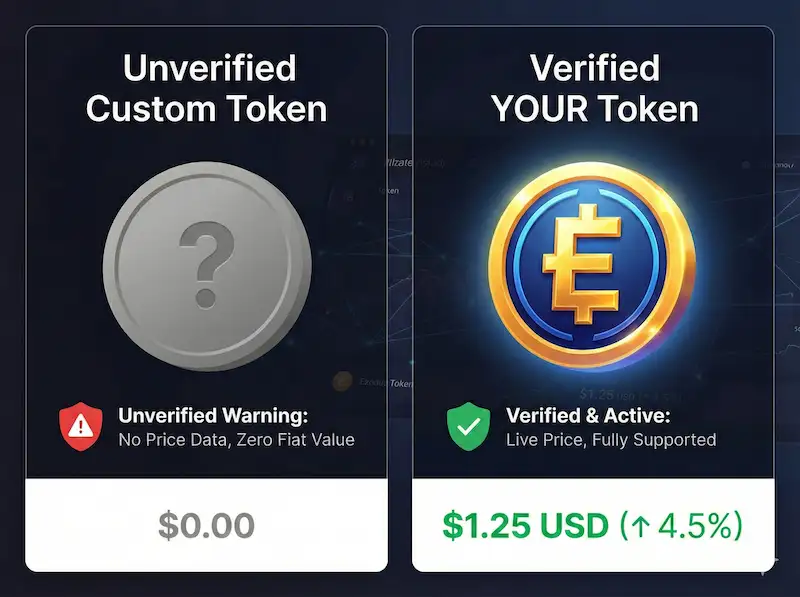
There is a massive difference between a token that merely exists and a token that thrives. First, Exodus can let users manually add some tokens by pasting a contract or mint address. This basic capability can enable balance display and simple transfers. However, it often does not include your official logo. Moreover, it usually fails to provide reliable fiat valuation and price charts. Consequently, users face friction, including unverified-token warnings. Therefore, if your strategic goal is to get token listed on Exodus, you should target full default support rather than manual import visibility.
The High Cost of Ignoring Requirements to Get Token Listed on Exodus
Consider a recent decentralized finance application that launched its native coin last year. Initially, the team built an excellent platform and attracted thousands of buyers. However, they ignored wallet-readiness details before trying to get token listed on Exodus. As a result, users saw a blank icon and zero fiat value. Consequently, panic selling started fast, and many holders assumed the project was unsafe. Within three days, market capitalization dropped by 25 percent. Therefore, founders should treat visual trust as a core launch milestone, not a cosmetic afterthought.
| Feature | Level A (Manually Added Custom Token) | Level B (Fully Supported Asset) |
|---|---|---|
| Balance Display | Yes | Yes |
| Receiving and Sending | Yes (if network supported) | Yes |
| Official Brand Logo | No (often blank/placeholder) | Yes |
| Live Price & Fiat Valuation | No | Yes |
| User Trust / UX | Friction (shows “unverified token” warning) | Seamless (search and discovery works cleanly) |
When you achieve Level B, your token shows a live, updating price and appears in portfolio totals. Furthermore, search and discovery work cleanly across devices. Finally, users no longer need to paste addresses manually. To get token listed on Exodus at this level, you need an integration packet that is easy to verify and safe to ship.
Building Your Token Readiness Kit to Get Token Listed on Exodus
Most integrations stall because identity is ambiguous or pricing is unreliable. Therefore, prepare a readiness kit before contacting support. To get token listed on Exodus, write one Token Identity Block and reuse it everywhere. Include exact project name, token name, and ticker casing. Additionally, provide your official website, docs page, domain email, and social links. Then add a clear one-paragraph description of utility and purpose. Next, specify token standard, supported networks, and canonical chain. Finally, explain whether other chains are bridged representations and how supply is managed across them.
Establishing On-Chain Clarity to Get Token Listed on Exodus
Reviewers and market-data providers verify facts on explorers. Therefore, publish your contract source code where possible, especially on EVM chains. Moreover, keep decimals consistent unless you have a strong technical reason. Include a public contracts page with chain name, contract or mint address, deployment transaction hash, and direct explorer links. If you migrated from V1 to V2, state it explicitly. Likewise, clarify which version is active and whether older versions should be ignored. This clarity reduces review cycles and prevents listing delays.
Securing Trusted Liquidity to Get Token Listed on Exodus
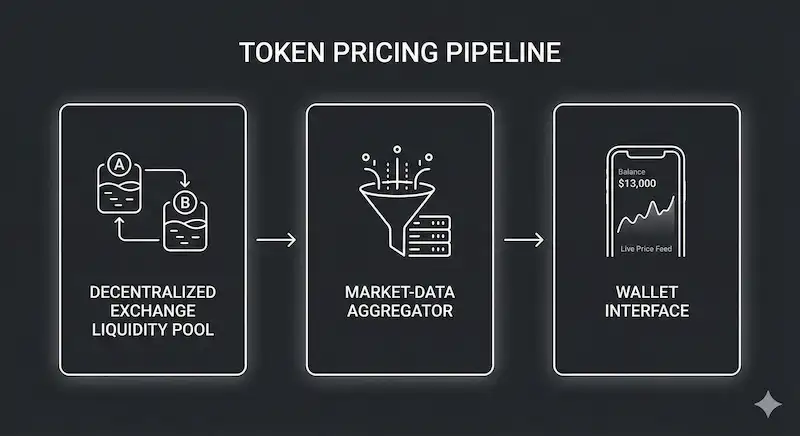
Wallet price display is usually derived from market-data aggregators, not raw on-chain state. Therefore, maintain at least one meaningful trading venue with real liquidity depth. In addition, concentrate volume into one or two primary pairs instead of fragmenting across weak pools. Choose clean base pairs, such as major stablecoins or wrapped native assets. Consequently, you reduce variance spikes and improve price reliability. To get token listed on Exodus with stable valuation, follow this exchange-listing pathway to appear on CoinMarketCap and CoinGecko before filing wallet-level price requests.
Formulating a Transparent Security Posture Statement
Transparency accelerates your Exodus integration request. Therefore, explain whether the token is mintable, pausable, blacklist-enabled, taxable, or upgradeable. Also, define who controls each admin function today. If audits or code reviews exist, link them directly. Likewise, include your bug bounty details if active. Wallet teams are risk managers first; consequently, the faster they understand your control surface, the faster they can move your request forward.
Network-Specific Checklist to Get Token Listed on Exodus Without Wallet Errors
Different blockchains have distinct technical requirements. First, for each EVM deployment, provide chain name, chain ID, checksummed contract address, token standard, decimals, and contract-returned name and symbol. Next, include an explorer link and upgradeability details. Also, disclose transfer restrictions and fee logic if they exist.
However, several patterns regularly break wallet UX. Avoid unpredictable transfer hooks, hidden blacklist mechanics, and undocumented proxy upgrades. In addition, avoid non-standard allowance behavior and unusual return-value logic. Otherwise, even a valid contract can still fail wallet compatibility checks during review.
EVM Gas Asset Rules and Solana Metadata Requirements to Get Token Listed on Exodus
Users need the base network asset to move tokens. For example, Ethereum requires ETH, BSC requires BNB, Avalanche C-Chain requires AVAX, Polygon requires POL (or current gas token), Solana requires SOL, and Tron requires TRX. Therefore, communicate gas requirements clearly in your docs. Moreover, for Solana, specify mint address, decimals, token standard (legacy SPL or Token-2022), active extensions, metadata authority status, and governance over updates. Additionally, validate branding consistency with this Phantom wallet logo and price workflow and this Solscan logo setup guide.
| Blockchain Network | Required Gas Asset | UX Implication |
|---|---|---|
| Ethereum (EVM) | ETH | Users cannot move ERC-20 tokens without holding ETH. |
| BNB Smart Chain (BSC) | BNB | Users cannot move BEP-20 tokens without holding BNB. |
| Avalanche C-Chain | AVAX | Users cannot move ecosystem tokens without holding AVAX. |
| Polygon PoS | POL (or current gas token) | Users cannot transact without network native gas. |
| Solana | SOL | Required for rent/fees and associated token account creation. |
| Tron | TRX | TRC-20 transfers consume bandwidth/energy, often subsidized by TRX. |
Solana Governance Best Practices and Tron Integration Rules
A founder best practice is to keep metadata complete, consistent, and brand-aligned. Therefore, avoid mutable identity without a governance story. Solana users also need native SOL for rent and associated token account creation. Consequently, even a free-transfer token still depends on network gas in practice.
For Tron, use TRC-20 standards with clear contract details, decimals, symbol, name, explorer links, and admin controls. Additionally, explain fee behavior, mint/burn permissions, and address-activation requirements. Likewise, optimize transfer logic to avoid poor UX from high estimated costs. You can verify best practices with this TronScan logo guide and this TronLink TRC20 logo-and-price guide.
How to Show Token Price and Get Token Listed on Exodus Correctly
Many developers ask why their token shows balance but no fiat value. However, Exodus does not display price just because a contract exists on-chain. Instead, price display requires a clean mapping from contract identity to recognized market-data records and then to wallet price mapping. Therefore, make your token easy to identify across major aggregators with verifiable liquidity. To get token listed on Exodus with a live price, ensure each supported network has the correct contract or mint mapping. Furthermore, reduce delays by aligning with this CoinGecko listing guide and this fast CoinMarketCap listing guide.
The Pricing Pipeline Hierarchy
(The on-chain asset identity)
(Deep liquidity on major DEX or CEX)
(Indexed by CoinGecko, CoinMarketCap, etc.)
(Wallet cross-references providers to verify sanity checks)
(Success!)
Building Deep Liquidity to Show Token Price in Exodus Wallet
Wallet pricing is strongest when most volume sits in a few trusted markets. Therefore, concentrate liquidity where depth is real and APIs are stable. If you are DEX-first, choose one flagship venue per chain and make it your primary price anchor. Meanwhile, keep secondary venues aligned to avoid drift. Otherwise, major variance can trigger wallet failsafes. To get token listed on Exodus with consistent pricing, keep spread quality high and cross-source deviation low.
How Fragmentation Causes the Exodus Token Price Not Showing Error
A common failure pattern is liquidity fragmentation across too many pools. For example, one gaming studio split liquidity across five DEXs and created unstable implied prices. Consequently, wallet variance checks suppressed price display. Users then reported the Exodus token price not showing issue, and support queues grew quickly. However, once the team consolidated liquidity into one primary market, pricing normalized. Likewise, the same dependency is explained in this MetaMask token price display guide, which helps diagnose similar cross-wallet errors.
Selecting a Multi-Chain Pricing Strategy to Get Token Listed on Exodus
If you deploy on multiple chains, wallet systems treat those as distinct assets. Therefore, choose one explicit pricing model: canonical-chain pricing or per-chain pricing. In the first model, liquidity and price identity live on one chain and other chains are bridged representations. In the second model, each chain needs meaningful liquidity and separate market-data mapping. Consequently, documenting this model publicly prevents mismatches and support confusion.
Ensuring Your Token Logo in Exodus Wallet Appears Perfectly to Get Token Listed on Exodus
Visual branding builds immediate holder trust. Therefore, prepare a square transparent PNG at high resolution and test readability at tiny sizes. Also, include dark-mode and light-mode checks, plus a high-resolution source master. Moreover, define clear spacing and background rules in a short brand note. Avoid text-heavy icons, thin strokes, and micro-details that break when masked. However, many QA fundamentals in this MetaMask token logo tutorial apply directly to Exodus submissions.
Wrong-logo incidents are common when multiple assets share a ticker. In addition, wrapped or bridged tokens can inherit incorrect branding from third-party sources. Therefore, keep one official logo pack across your website, explorer pages, and aggregator submissions. Make contract and mint addresses highly visible in docs, and explicitly label canonical versus bridged assets. Consequently, your logo remains consistent after distribution updates.
The Open-Source Path to Get Token Listed on Exodus
Exodus integrations require precision in metadata and icon formatting. Typically, one repository defines asset metadata while another stores icons. Therefore, contribute a correctly formatted token identity record and a compliant icon asset in the correct folder structure. Common pull-request failures include wrong icon dimensions, bad optimization, incorrect folder naming, or malformed JSON. Likewise, non-checksummed EVM addresses and unclear token identity details often delay approval. As a result, reviewer-friendly clarity is a competitive advantage.
Find a Directory for a Chain
Repository structures vary, but the pattern is usually predictable. First, locate the chain directory. Next, create a token directory named by contract or mint address. Then add logo and metadata files with name, symbol, decimals, address, website, explorer link, and short description. Keep decimals exact, use checksummed EVM addresses, and align public branding with contract-returned values. Finally, include one clear explorer link per chain.
To run a fast-lane workflow, fork the relevant repositories and submit one clean pull request per change set. Additionally, include your token identity block, chain-specific addresses, liquidity proof, market-data links, and admin-control notes. Respond quickly to requested fixes, because speed of iteration directly affects merge timing. Once merged, downstream package updates and wallet release cycles complete the rollout.
Broad Enablement and the Integration Request
Adding an icon and metadata helps, but broad discoverability usually needs direct coordination with Exodus. Therefore, send a complete integration request through official channels. Include name, symbol, description, website, docs, official email, and social links. For each deployment, provide network, standard, contract address, decimals, explorer link, and source-verification status. Also, disclose upgradeability, transfer restrictions, taxes, blacklist logic, and mint/burn permissions with control ownership.
Next, clarify financial data with primary market links, aggregator listings, canonical pricing strategy, and liquidity notes. In addition, provide a direct logo-pack download URL on your domain and your preferred icon background behavior. Finally, share audits, bug bounty details, and admin-key governance policy. In practice, wallets prioritize assets with clear demand, reliable pricing, and low review risk. Consequently, a complete and transparent packet moves faster.
Post-Integration Quality Assurance Testing
Once your token appears with logo and price, test like a wallet QA team. First, validate logo clarity at small sizes and confirm exact name/symbol casing. Next, verify decimals using tiny send-and-receive test transfers. Then confirm price availability on desktop and mobile, and check that updates continue over time. Also, ensure search discovers the token without manual address import.
Afterward, verify chain routing, fee display, and multi-chain separation behavior. If anything is wrong, submit a precise report with screenshots, app version, expected behavior, contract addresses, and market-data links. Consequently, support teams can reproduce and resolve issues faster.
Troubleshooting Common Visibility Issues to Get Token Listed on Exodus Reliably
If your token shows balance but no price, common causes are clear. A provider may list your token, yet map the wrong contract. Alternatively, liquidity may be too thin or fragmented. In addition, symbol conflicts can block ambiguous mapping, and old contracts may remain tied to legacy pricing feeds. Therefore, fix mapping on major providers, concentrate liquidity, and document canonical chain versioning clearly before resubmission.
If the wrong logo appears, check registry formatting, folder naming, and brand consistency across website, explorers, and aggregators. Likewise, make contract identity dominant in docs to prevent ticker-based confusion. If users still see unverified status, they are likely importing manually. Full support requires a shipped asset definition, a correct icon, and verified market-data mapping.
Protecting Your Project During the Listing Process
Founders are frequent targets for impersonation scams during wallet integrations. For example, scammers may request fake validation fees or private keys to “sync” listing status. Never share seed phrases, private keys, passwords, or wallet sync QR codes. Likewise, never trust direct messages as official support without verification. Use only official public channels, and keep requests auditable whenever possible. Therefore, treat every submission artifact as a security document.
The Long-Term Playbook for Stable Visibility
Wallet visibility can break over time if metadata is treated as one-and-done. Therefore, maintain a canonical contracts page and update it immediately after migrations. When launching new chains, update market-data mappings first and wallet registries second. In addition, version metadata and brand assets like production infrastructure. Plan for symbol conflicts early, because contract identity is your anchor. Consequently, long-term support remains stable across ecosystem updates. Also, if you want a broader cross-wallet strategy, read this step-by-step OKX Wallet token visibility guide to align logo, metadata, price feeds, and trust signals.
Frequently Asked Questions
1. How long does it take to get token listed on Exodus?
The timeline varies based on your project readiness. Once you submit a flawless integration request with verified on-chain data, deep liquidity, and a proper open-source pull request, it typically depends on the platform software release cycles. Properly formatted submissions move much faster.
2. Why is my token icon not showing in Exodus?
Your token icon not showing in Exodus usually means you have not submitted a properly formatted logo pack to the official asset registry. It can also occur if your token identity has conflicting symbol images across external metadata aggregators.
3. How do I fix the custom token no price Exodus issue?
To fix the custom token no price Exodus error, you must ensure your token has deep, concentrated liquidity on a major exchange. Additionally, your smart contract must be correctly mapped on primary market-data platforms so the wallet software can fetch accurate data without triggering variance failsafes.
4. What are the main Exodus wallet token listing requirements?
The primary Exodus wallet token listing requirements include a clear token identity, a verified smart contract on block explorers, significant trading liquidity mapped correctly on data aggregators, and a professionally formatted open-source pull request containing your metadata JSON and logo.
5. Do I have to pay a fee to add token to Exodus wallet?
No. You should never pay a listing fee to direct messages or third parties. Legitimate Exodus asset integration is based on project quality, user demand, correct open-source contributions, and verified market liquidity. Anyone asking for funds or private keys is a scammer.